Jump to content
View in the app

A better way to browse. Learn more.

Scrap Mechanic Russia

A full-screen app on your home screen with push notifications, badges and more.

To install this app on iOS and iPadOS
  1. Tap the Share icon in Safari
  2. Scroll the menu and tap Add to Home Screen.
  3. Tap Add in the top-right corner.
To install this app on Android
  1. Tap the 3-dot menu (⋮) in the top-right corner of the browser.
  2. Tap Add to Home screen or Install app.
  3. Confirm by tapping Install.

T-90A «Владимир»

Данный танк был построен с душой человеком Miau (ныне OleG), Виталя так же принимал участие в создании танка (В создании ходовой и т.д.). Танк содержит такие моды как "New Legend", "MJM" и "Cannons Pack Ricochets". Танк сделан с любовью ❤️ 

Список обязательных модов:

  1. https://scrapmechanic.ru/files/file/21-cannons-pack/
  2. https://scrapmechanic.ru/files/file/125-cannons-pack-ricochets-and-penetrations/
  3. https://scrapmechanic.ru/files/file/92-new-legend-mod-creative/
  4. https://scrapmechanic.ru/files/file/83-mjm-mod/

Инструкция

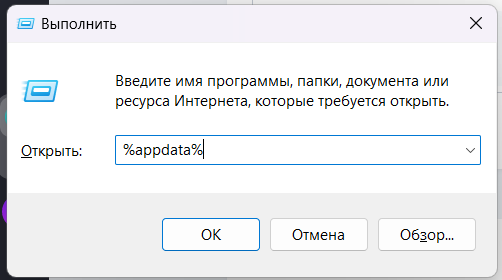
  1. Нажимаем win+R и вводим %appdata%
    image.png
  2. Переходим по пути
    Axolot Games\Scrap Mechanic\User\User_цифры\Blueprints
  3. Распаковываем папку из архива в эту папку
User Feedback

Join the conversation

You are posting as a guest. If you have an account, sign in now to post with your account.
Note: Your post will require moderator approval before it will be visible.

Guest
  • This will not be shown to other users.
  • Your review Required
    Add a review...
Guest Алексей

Guest Алексей

   1 of 1 member found this review helpful 1 / 1 member

постройка топ, но башня очень сильно лагает, как только её убираю лагать перестаёт.

Guest Никита

Guest Никита

   0 of 1 member found this review helpful 0 / 1 member

почему когда я спавню постройку у меня пишется невозможно построить постройку пытаюсь её обновить а там пишется это не ваша постройка


Account

Navigation

Search

Configure browser push notifications

Chrome (Android)
  1. Tap the lock icon next to the address bar.
  2. Tap Permissions → Notifications.
  3. Adjust your preference.
Chrome (Desktop)
  1. Click the padlock icon in the address bar.
  2. Select Site settings.
  3. Find Notifications and adjust your preference.